
Custom Fields Guide
Custom fields allow administrators to extend SysAid entities with additional data beyond the default fields provided by the system. This enables organizations to tailor SysAid to their specific workflows, processes, and reporting needs.
Administrators can create custom fields in the SysAid interface and add them to various entities, such as service records, assets, CIs, etc. Once created, these fields behave like standard fields and can store organization-specific information.
Learn more about creating custom fields in SysAidGo to SysAid Documentation to learn more about custom fields and how to crate and manage them:
Accessing custom fields via API
While custom fields cannot be created or modified through the API, they can still be discovered and used when retrieving data.
API limitations
Custom fields are not currently manageable via the API. This means:
- Custom fields cannot be created via the API
- Custom fields cannot be modified via the API
- Custom fields cannot be deleted via the API
All custom field configuration must be performed through the SysAid user interface.
Retrieve all custom fields in your account
You can retrieve metadata about all custom fields configured for various entities (service record, asset, user, etc.) in your SysAid account using the Get a List of Custom Fields endpoint.
This endpoint returns information such as:
| Property | Description |
|---|---|
entityType | The type of entity you want to view the custom fields for. The entities include: - Service record |
fieldName | The internal name or ID of the field used by the system. |
fieldCaption | The name of the custom field as it is displayed in your system. |
fieldType | The type of field (text, dropdown, date, etc.) |
Values | The values that are currently configured in your system for this custom field. |
You can retrieve all custom fields in an account per entity type.
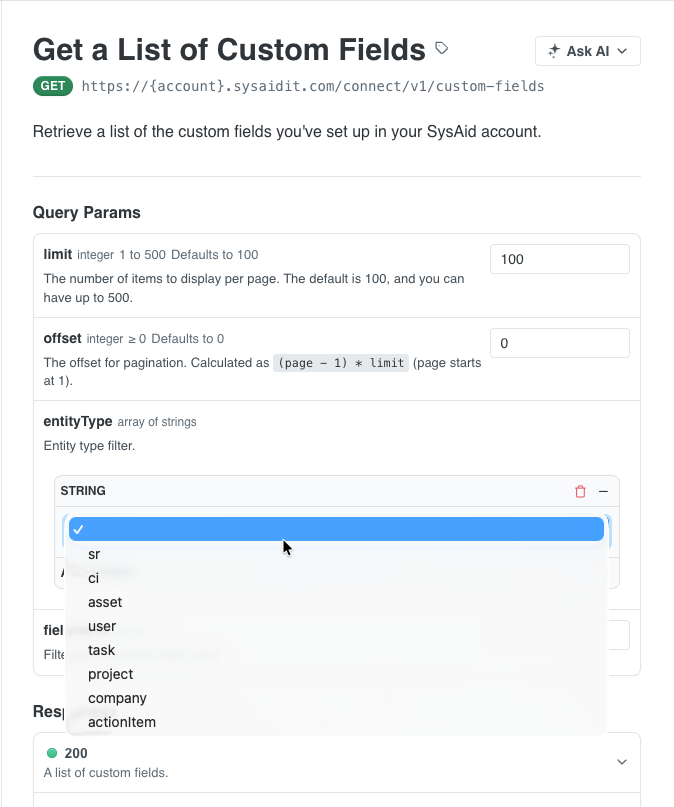
This endpoint is useful for discovering which custom fields exist before working with entity data that may contain them.
[
  {
    "fieldName": "sr_cust_soft_list",
    "fieldCaption": "Software Selection",
    "fieldType": "multiSelectList",
    "entityType": "sr",
    "values": {
      "1": "Adobe",
      "2": "Salesforce",
      "3": "MS Teams",
      "4": "Snag-It/Camtasia",
      "5": "Power BI",
      "6": "Teamviewer"
    }
  },
  {
    "fieldName": "sr_cust_equip_list",
    "fieldCaption": "Equipment list",
    "fieldType": "multiSelectList",
    "entityType": "sr",
    "values": {
      "1": "Desktop",
      "2": "Laptop",
      "3": "Monitor",
      "4": "Keyboard",
      "5": "Mouse",
      "6": "Headset"
    }
  }
]
Custom fields in service records
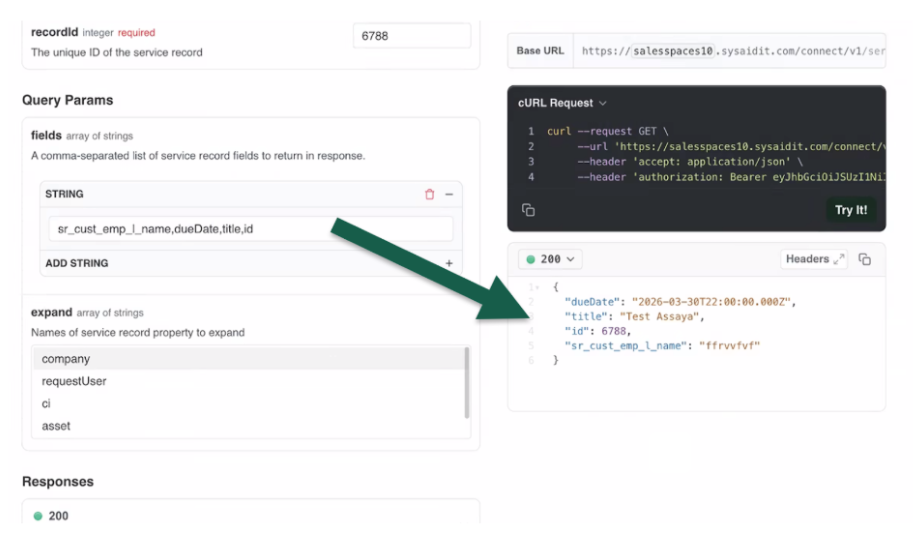
Custom fields associated with service records can appear in the response when retrieving a service record using the Get a Service Record by ID endpoint.
Custom fields aren’t included in the payload by default. Custom fields are entirely set by you as you configure them and differ from one account to the next.
You must specify in the fields parameter which custom fields you want to include so that the system knows to add them in the payload.
Please note:When you add custom fields to the fields parameter, the payload will include only the custom fields and no other information, and any other fields you include (comma-separated values).
When included, the response will contain the custom fields that exist for that specific service record.
Custom fields in Webhooks
SysAid provides two service record webhook events:
- Service Record Created
- Service Record Updated
Custom fields may appear in webhook payloads depending on how the record was created or updated.
“Service record created” Webhook
Custom fields are included in the webhook payload only if the service record was created through the SysAid interface.
If a service record is created via the API, custom fields will not be included in the creation webhook payload since custom fields are not created when creating a service record from the API.
{
  "eventName": "sr.created",
  "srId": 148,
  "updates": [
    {
      "fieldName": "assignedGroup",
      "currentValue": "none",
      "previousValue": "",
      "timestamp": 1751280965889
    },
    {
      "fieldName": "autoPopulatedTicket",
      "currentValue": "false",
      "previousValue": "",
      "timestamp": 1751280965889
    },
    {
      "fieldName": "richTextFields",
      "currentValue": "[RichTextFieldRequest(referencedEntityTableName=service_req, jsonContent={\"text\":\"<p>what</p>\",\"attachments\":[],\"inlineImages\":[]}, columnName=description)]",
      "previousValue": "",
      "timestamp": 1751280965889
    },
    {
      "fieldName": "ticketTemplateId",
      "currentValue": "5",
      "previousValue": "",
      "timestamp": 1751280965889
    },
    {
      "fieldName": "customColumnsFields",
      "currentValue": "{}",
      "previousValue": "",
      "timestamp": 1751280965889
    },
    {
      "fieldName": "source",
      "currentValue": "1",
      "previousValue": "",
      "timestamp": 1751280965889
    },
    {
      "fieldName": "duplicate",
      "currentValue": "false",
      "previousValue": "",
      "timestamp": 1751280965889
    },
    {
      "fieldName": "type",
      "currentValue": "incident",
      "previousValue": "",
      "timestamp": 1751280965889
    },
    {
      "fieldName": "title",
      "currentValue": "test 123",
      "previousValue": "",
      "timestamp": 1751280965889
    },
    {
      "fieldName": "priority",
      "currentValue": "1",
      "previousValue": "",
      "timestamp": 1751280965889
    },
    {
      "fieldName": "version",
      "currentValue": "1",
      "previousValue": "",
      "timestamp": 1751280965889
    },
    {
      "fieldName": "secondaryCategory",
      "currentValue": "14",
      "previousValue": "",
      "timestamp": 1751280965889
    },
    {
      "fieldName": "srType",
      "currentValue": "1",
      "previousValue": "",
      "timestamp": 1751280965889
    },
    {
      "fieldName": "primaryCategory",
      "currentValue": "4",
      "previousValue": "",
      "timestamp": 1751280965889
    },
    {
      "fieldName": "urgency",
      "currentValue": "1",
      "previousValue": "",
      "timestamp": 1751280965889
    },
    {
      "fieldName": "requestUser",
      "currentValue": "admautoqa",
      "previousValue": "",
      "timestamp": 1751280965889
    },
    {
      "fieldName": "coreUpdate",
      "currentValue": "false",
      "previousValue": "",
      "timestamp": 1751280965889
    },
    {
      "fieldName": "assignee",
      "currentValue": "adm",
      "previousValue": "",
      "timestamp": 1751280965889
    },
    {
      "fieldName": "status",
      "currentValue": "1",
      "previousValue": "",
      "timestamp": 1751280965889
    },
    {
      "fieldName": "thirdLevelCategory",
      "currentValue": "20",
      "previousValue": "",
      "timestamp": 1751280965889
    }
  ]
}
“Service Record Updated” Webhook
The updated webhook only contains the data that changed in the service record.
If a custom field value is updated, the webhook payload will include that field as part of the updated data.
{
  "eventName": "sr.updated",
  "srId": 84521,
  "updates": [
    {
      "fieldName": "status",
      "currentValue": "3",
      "previousValue": "2",
      "timestamp": 1762357334123
    },
    {
      "fieldName": "assignee",
      "currentValue": "adm_jcena",
      "previousValue": "adm_rock",
      "timestamp": 1762357334123
    },
    {
      "fieldName": "sr_cust_soft_list",
      "currentValue": "3",
      "previousValue": "2",
      "timestamp": 1762357334123
    }
  ]
}
Custom fields in assets
When you get information about an asset of a CI, any custom field values associated with that asset will appear in the response under the customColumnsFields parameter.
{
  "name": "DEMO1-PM",
  "type": "Workstation",
  "source": "agent",
  "manufacturer": "VMware",
  "model": "VMware7,1",
  "serial": "VMware-42 3a 71 d6 54 a4 b4 00-bf b8 34 2e 5b ae c2 7a",
  "description": "Change note",
   "warrantyExpiration": "2026-03-01",
  "patchManagementEnabled": true,
  "os": {
    "name": "Windows 10 Enterprise Professional",
    "version": "10.0.19045 Multiprocessor Free"
  },
  "network": {
    "macAddresses": [
      "00:50:56:BA:A4:AE (fe80::32a:76ca:617:39dd%5",
      "10.14.1.16)"
    ],
    "ipAddresses": [
      "10.14.1.16"
    ]
  },
  "customFields": {
    "asset_cust_addon_chromebook_chrome_version": "1.1",
     "asset_cust_addon_chromebook_diskspace_useage": "",
    "asset_cust_addon_chromebook_last_policy": "",
    "intune_id": "",
    "asset_cust_assetstats": 1,
    "asset_cust_license_key": "",
  }
{
  "ciTypeId": 1,
  "ciSubtypeId": 12,
  "id": 8,
  "name": "SAP server",
  "version": 2,
  "serialNumber": "VS000004",
  "primaryCategoryId": null,
  "secondaryCategoryId": null,
  "thirdLevelCategoryId": null,
  "ownerId": null,
  "ownerGroupId": null,
  "locationId": null,
  "companyId": null,
  "statusId": 1,
  "priorityId": null,
  "supplierId": null,
  "supplyDate": null,
  "acceptDate": null,
  "customFields": {
    "ci_cust_prodtype": null,
    "ci_cust_servcentemail": null,
    "ci_cust_saledets": null,
    "ci_cust_pumpserialnum": null,
    "ci_cust_servcentphnum": null,
    "ci_cust_unitcost": null,
    "ci_cust_servcentaddr": null,
    "ci_cust_accountnum": null,
    "ci_cust_partcost": null,
    "ci_cust_servcentname": null
  }
}
Updated 3 months ago